
Overview
The Gist Answers plugin connects a WordPress site to Gist Answers, the AI answer service from ProRata.ai. Once a site is connected, the plugin does four things:
- Keeps your content in sync. It registers the site as a content source in Gist Answers and tells Gist Answers whenever eligible content is published or updated, so answers are grounded in your own articles. See Content ingestion.
- Displays widgets. It renders Gist Question Widgets and Answer Widgets anywhere on the site, through blocks, a shortcode, a sidebar widget, or a PHP function. See Widgets.
- Brings the Gist console into WordPress. Widget management, website settings, the Sandbox, suggested questions, and reports open inside the WordPress admin. See Gist Answers admin menu.
- Manages many sites at once. On WordPress Multisite, a Network Hub lists every site in the network with its activation and ingestion status. See Multisite.
There are two kinds of widget. A Question widget invites visitors to ask a question and sends them to an answer page. An Answer widget is the answer experience itself, placed on that answer page. See Widget types.
Requirements
| Requirement | Details |
|---|---|
| WordPress | 6.8 or later; tested up to 7.0. Single-site and Multisite installations are supported. On Multisite the plugin is network-activated. |
| PHP | 8.0 or later; tested on 8.2 through 8.5. Token encryption uses libsodium when available, otherwise OpenSSL. |
| Gist Answers account and API key | Your API key arrives in an onboarding email from answers@gist.ai. The same email contains a Set password link for creating your Gist console account, which you need to open the widget, settings and report screens. If you don’t have either, contact your Gist onboarding contact or support@gist.ai. |
| WordPress permissions | An administrator (manage_) can open the Gist Answers menu, activate the site and manage ingestion. Entering or changing the API key on Multisite needs a network administrator (manage_), because the key is stored for the whole network. Placing a widget in a page needs permission to edit that page. |
| Hosting | Any WordPress host that allows plugins to be installed. WordPress VIP customers can add the plugin from the VIP Integrations Center or deploy it through their wpcomvip repository. See Installation. |
| Connectivity | The WordPress server must be able to reach https://cms.gist.ai over HTTPS. Gist Answers reads published content through the site’s public WordPress REST API, so the posts endpoint must be reachable from the internet. Visitors’ browsers load widget code from Gist Answers. |
| WP-Cron | Recommended. Queued content is sent to Gist Answers by WP-Cron shortly after it is published. If WP-Cron is disabled, queued content is sent only while someone is using the WordPress admin. |
Installation
The current release is available as a ZIP at cdn.gist.ai/wordpress/gist-answers-wp-plugin.zip. The release ZIP ships with its compiled assets and autoloader, so no build step is needed. The plugin folder is gist-answers and the entry file is gist-answers.php.
For a screenshot-by-screenshot walkthrough of each option, see Step 1 of the setup guide.
Standard WordPress
- Single site: go to Plugins → Add Plugin → Upload Plugin, choose the ZIP, click Install Now, then Activate Plugin.
- Multisite: log in as a network administrator, go to My Sites → Network Admin → Plugins → Add Plugin → Upload Plugin, choose the ZIP, click Install Now, then Network Activate.
- Alternatively, upload the unzipped
gist-answersfolder towp-content/plugins/and activate it from the Plugins screen.
WordPress VIP
VIP does not allow plugins to be uploaded from the WordPress admin. Use one of these two options.
Option A: add Gist Answers from the VIP Integrations Center (recommended)
VIP supplies, loads and updates the plugin, and the API key is managed in the VIP Dashboard rather than in WordPress. An Org admin adds the integration to the organization; an App admin or Org admin configures it for each environment.
- In the VIP Dashboard, open the Integrations Center, open Gist Answers, and click + Add to Organization.
- Open your application, select Integrations, and choose an environment. Start with production: the first site you activate in the plugin must be your live site.
- Click Configure next to Gist Answers, turn Activate Integration to Active, enter the key from your onboarding email in the Gist API token field, and save. On a multisite network this activates the plugin for every site in the network.
- Repeat for any staging or development environment you want to test on, using the same key.
The plugin then reads the key from the VIP runtime config and hides its own key-entry form. See WordPress VIP runtime config.
Option B: install the plugin through your wpcomvip repository
Use this to manage the plugin code yourself. You need write access to the site’s wpcomvip GitHub repository. VIP’s guide to adding plugins covers the workflow in detail.
- Unzip the plugin. VIP needs the
gist-answersfolder, not the ZIP. - In the repository, create a branch and add the folder to the
pluginsdirectory. - Open a pull request and merge it into the branch that deploys to production, plus any non-production environments you want to test on. VIP deploys merged code automatically.
- Activate the plugin from the Plugins screen (Network Activate on a multisite network), or in code as described below.
With a manual install, the API key is entered in the plugin dashboard, the same as on standard WordPress, unless you supply it through an environment variable or constant. See API key sources.
Activating in code on WordPress VIP
VIP recommends loading plugins in code so that every environment runs the same set. Instead of activating Gist Answers from the Plugins screen, add this line to client-mu-plugins/plugin-loader.php and deploy it:
wpcom_vip_load_plugin( 'gist-answers' );On a multisite network this loads the plugin for every site. A plugin loaded this way shows no Deactivate or Network Deactivate link on the Plugins screen; to remove it, delete the line and deploy again. See Deactivating.
After activation
A Gist Answers item appears in the WordPress admin menu (on Multisite, under My Sites → Network Admin → Dashboard as well as in each site’s own admin), and a notice links to the dashboard where you connect the site. The plugin makes no requests to Gist Answers until an API key is available from one of the supported sources.
Connecting to Gist Answers
Connecting has two parts: supplying an API key, which authenticates the whole WordPress installation with your Gist Answers account, and activating each WordPress site, which links it to a website in that account.
API key sources
The plugin looks for the API key in four places, in this order, and uses the first one it finds.
| # | Source | Notes |
|---|---|---|
| 1 | WordPress VIP runtime configVIP_ | Defined by the VIP platform from what you enter in the VIP Dashboard. When this config is present it is always used, even if it is incomplete, and the other sources are ignored. See WordPress VIP runtime config. |
| 2 | Server environment variableGIST_ | Set in the web server or PHP-FPM environment. The plugin shows a notice naming the server administrator if the key is rejected. |
| 3 | PHP constantGIST_ | Defined in wp-config.php or a must-use plugin, before the plugin loads. |
| 4 | Gist Answers dashboard | Entered by an administrator (a network administrator on Multisite). Stored encrypted in the WordPress database: as a network-wide option on Multisite, otherwise as a site option. |
Example of supplying the key as a constant in wp-config.php:
define( 'GIST_ANSWERS_API_KEY', 'your-api-key' );When the key comes from any source other than the dashboard, the dashboard hides its key-entry form. When it comes from the VIP runtime config, the plugin’s admin screens also show a notice that the token is managed by WordPress VIP.
wp-config.php, the stored key can no longer be decrypted; the dashboard will ask for the key again, so keep your onboarding email.If Gist Answers rejects the key, the plugin tells you where to fix it: the dashboard asks for a new key when the key was entered there, and shows a notice pointing to the VIP Dashboard, the server environment, or the WordPress configuration when the key came from one of those sources.
WordPress VIP runtime config
When Gist Answers is added from the VIP Integrations Center, the platform defines the PHP constant VIP_, a plain associative array, before the plugin loads. Its contents come from the integration’s configuration form in the VIP Dashboard.
| Key | Type | Required | Description |
|---|---|---|---|
api_ | secret | Yes | The API token for your Gist Answers partner account, from the onboarding email sent by answers@gist.ai. VIP stores it encrypted and never exposes it back through its API. |
| State of the config | How the plugin behaves |
|---|---|
| Valid (all required fields set) | The token from the config is used. The dashboard’s key-entry form is hidden and a notice says the token is managed by WordPress VIP. |
Incomplete (setup in progress; api_ missing or empty) | No fatal error. The plugin stays disconnected, does not fall back to any other key source, and the dashboard names the missing field: “…its configuration (VIP_GIST_ANSWERS_CONFIG) is incomplete. Missing: api_token.” |
| Invalid (the constant is defined but is not an array) | Treated as if no config were set; the other key sources are checked in order. |
| Not defined | The environment variable, the PHP constant and the dashboard are checked in order. |
Example valid config (mock value):
define( 'VIP_GIST_ANSWERS_CONFIG', array(
	'api_token' => 'mock-token',
) );
Example incomplete config (setup in progress; the required api_ is missing):
define( 'VIP_GIST_ANSWERS_CONFIG', array() );Activating websites: matching, production and test sites
With a key in place, the dashboard lists each WordPress site as a card. A single-site installation lists one site; a Multisite installation lists every site in the network. Click Activate website next to a site to link it to your Gist Answers account.
- Matching. If a website with the same domain already exists in your account, the plugin links the WordPress site to it immediately, without a dialog. The domain in WordPress and the domain saved in Gist must match exactly; if only the name matches, you will see an “already exists” error.
- Activating a new website. Otherwise a dialog offers to activate the site as a new website at the address shown. Activation sends the site’s name, tagline, domain and home URL, a Gist Answers category, a placeholder location, and the URL of its REST API posts endpoint, and starts content ingestion. See Data and external services.
- The first site must be production. Select This is not a test website for your live site and activate it before any staging or development site, so Gist ingests the right content. You don’t have to add widgets to the production site until you are ready.
- Every site after that can be another production site (This is not a test website) or a test site (This is a test website linked to: followed by the production website it mirrors).
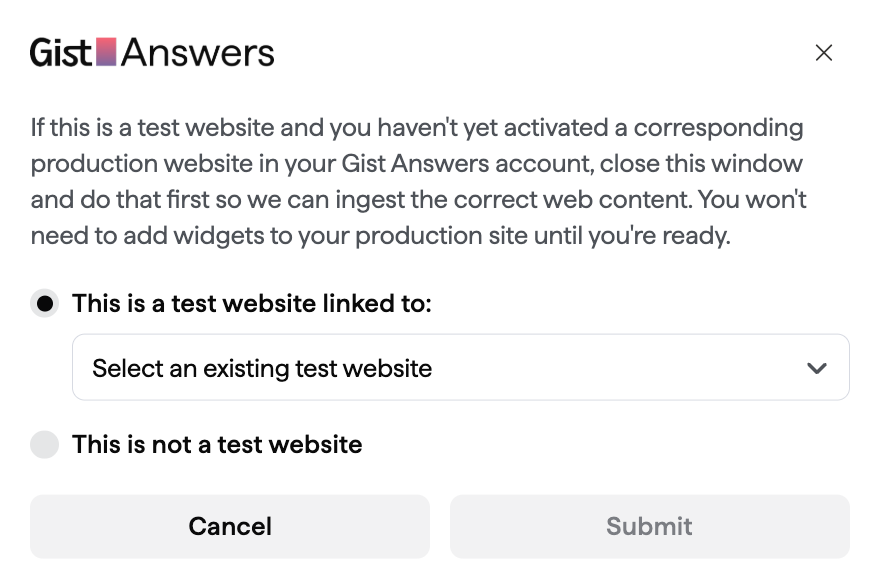
Production and test websites
A test site linked to a production site uses the same content, settings and widgets in your Gist Answers account; only the WordPress pages are separate. You can link more than one test site to the same production site. Because widgets are shared, editing a widget from a test site also changes it wherever it is live on the production site. To try out changes safely, create a separate widget for testing and add it to the production site when it is ready.
You cannot currently change which production site a test site is linked to from the plugin. Check the selection before you click Submit; if you link the wrong site, email support@gist.ai.
Once a site is activated, its card shows a Set up widgets button (later View widgets), the Content ingestion toggle and the ingestion Status. See Dashboard.
Gist Answers admin menu
The Gist Answers menu is available to administrators. Before the installation is connected it contains only the Dashboard. Once connected, the Manage and Reports groups appear; a Developer group appears only when the developer menu is enabled with a constant.

| Screen | What it is for |
|---|---|
| Dashboard | Connection status and the key-entry form (when the key is not supplied from elsewhere); one card per site with Activate website, Set up widgets / View widgets, the Content ingestion toggle, the ingestion Status, and Refresh ingestion status. See Content ingestion. |
| Manage → Widgets | Gist’s widget management: the guided Set up widgets flow, the Widgets tab listing your question widgets and answer pages, and each widget’s Edit, Copy shortcode and Get PHP code actions. See Creating and managing widgets. |
| Manage → Questions | The suggested questions your widgets show to visitors. |
| Manage → Sandbox | Gist’s Sandbox, for trying questions against your content and reviewing the answers. |
| Manage → Website Settings | The website as Gist sees it: name and category, homepage and development-site URLs, and content sources. |
| Reports → Answers | Questions asked and answers given on your site, including how many questions visitors have asked. |
| Reports → Content Usage | Which of your content is being used in answers. |
| Reports → Revenue | Revenue reporting for your Gist Answers account. |
| Developer → Tools & Options | Logging, diagnostics, API-error simulation, detected answer pages, and destructive cleanup tools. Hidden unless enabled. See Developer menu. |
The Manage and Reports screens are Gist console pages embedded from cms.gist.ai. The first time you open one you are asked to sign in with your Gist console credentials (the account created from the Set password link in your onboarding email). The plugin requests a short-lived ticket for each embedded page, so you never enter the API key there.
Network Hub (Multisite)
On a Multisite installation, My Sites → Network Admin → Dashboard → Gist Answers opens the Network Hub, which lists the sites in the network that you are a member of, with:
- site-title search, ascending and descending sorting, and pagination (20 sites per page by default; developers can raise this to 100 with the
gist_filter);answers_ network_ sites_ per_ page - each site’s activation status and Activate website action;
- each site’s ingestion status and Content ingestion toggle;
- links to the site’s own Gist Answers dashboard and to widget setup and management.
The Manage and Reports screens are not part of the Network Hub; open them from each site’s own Gist Answers menu.
Content ingestion
Ingestion is how your published content reaches Gist Answers. It has two parts: an initial crawl that Gist Answers runs when a site is activated, and ongoing notifications that the plugin sends when eligible content changes.
The crawl and its status
Activating a site registers it as a content source in Gist Answers and starts the crawl. Gist Answers reads published content through the site’s public WordPress REST API; the plugin itself sends no post content. The Status column on the dashboard shows where the crawl is:
| Status | Meaning |
|---|---|
| Ingestion queued | The crawl is waiting to run. This does not mean your content is ready yet. Answers about content that has not been ingested begin “Looks like I don’t have the sources…”. |
| Ingestion active (x of y feeds) | The crawl is running on the content sources (feeds) configured for the website. |
| Ingestion paused | The crawl has been stopped with the Content ingestion toggle. New content is not available for answers until it is resumed. |
Use the Content ingestion toggle on a site’s card to pause or resume the crawl, and Refresh ingestion status to fetch the latest status from Gist Answers.
Keeping content in sync
After the initial crawl, the plugin watches for changes to eligible content and queues it for Gist Answers:
- By default, eligible content is published posts (post type
post, statuspublish, any category or tag). Pages and other post types are included only if a filter adds them. - Content is queued when it is saved by a user who can edit it, or when WordPress publishes it on its own (for example, a scheduled post going live).
- Queued content is sent by WP-Cron shortly afterwards, after a minimum delay of 5 seconds, in batches of up to 10 posts. It is also sent during activity in the WordPress admin. If WP-Cron is disabled on the site, queued content is sent during admin activity only.
- Only the permalinks of the queued content are sent; Gist Answers then fetches the content through the REST API. If the Gist API cannot be reached or the key cannot be confirmed, sending is retried every five minutes.
- Deactivating the plugin clears its scheduled sending events. Pausing ingestion from the dashboard tells Gist Answers to stop the crawl; it does not stop the plugin queuing changes.
Customizing what is ingested
Developers can change the defaults with WordPress filters. Each filter receives the current value and returns the new one.
| Filter | Default | Purpose |
|---|---|---|
gist_ | array( 'post' ) | Post types whose changes are sent to Gist Answers. |
gist_ | array( 'publish' ) | Post statuses that are eligible. |
gist_ | array() (all terms) | A standard tax_ array (as accepted by WP_) that content must match. Use it to include or exclude categories, tags or custom taxonomies. |
gist_ | true | Per-post eligibility. Receives $should_, $post_ and $post; return false to skip a post. |
gist_ | 10 | Maximum posts sent per run (1–100). |
gist_ | 5 | Minimum delay in seconds between a change and its being sent (1–300). |
Example: include pages, and limit ingestion to the “news” and “guides” categories.
add_filter( 'gist_answers_ingest_post_types', function ( $types ) {
	$types[] = 'page';
	return $types;
} );

add_filter( 'gist_answers_ingest_tax_query', function () {
	return array(
		array(
			'taxonomy' => 'category',
			'field'    => 'slug',
			'terms'    => array( 'news', 'guides' ),
		),
	);
} );
Place filters in a must-use plugin or your theme’s functions.php (on VIP, in client-mu-plugins). The plugin also fires gist_ and gist_ actions; see the actions reference.
Widgets
Widgets are created and edited in Gist (from Gist Answers → Widgets in WordPress) and placed on the site with WordPress tools. Each widget has a Gist widget ID: question widgets use IDs beginning search-widget- and answer widgets IDs beginning chat-widget-. A widget belongs to a website in your Gist account, so a widget created for one website cannot be rendered on another.
Widget types
Question widgets
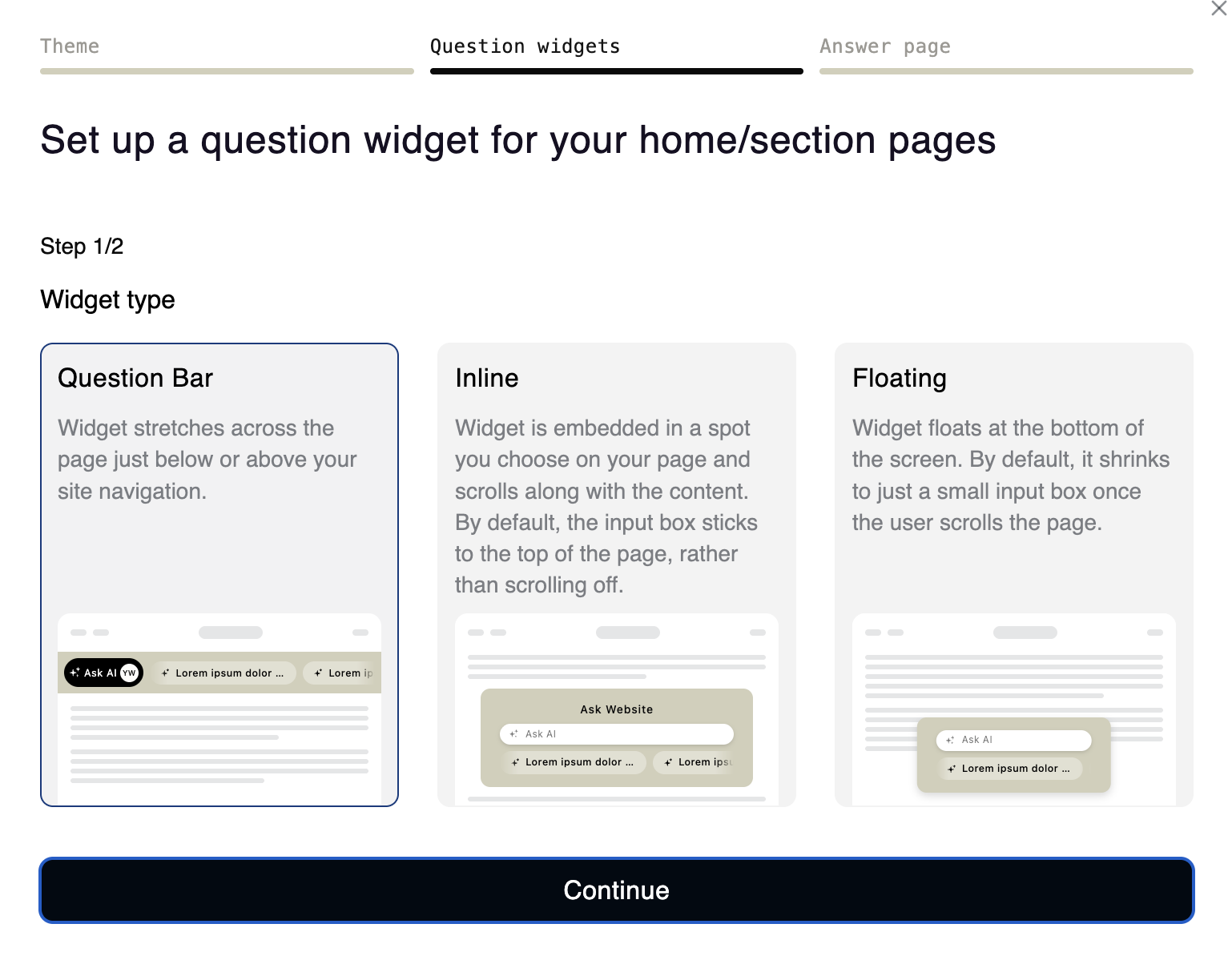
A question widget invites visitors to ask a question and takes them to the answer page you assign to it. It comes in three layouts; a widget’s initial settings are based on the widget theme you set, and the options available depend on the layout.
| Layout | Where it sits | Options |
|---|---|---|
| Question Bar | Stretches across the page, just above or below your site navigation. | Choose whether visitors get a Button, an Input box, or None (a scrolling marquee of suggested questions only); change the Prompt and Background color. |
| Inline | Sits in a spot you choose on the page and scrolls with the content. By default its input box pins to the top of the page instead of scrolling off. | Customize the Header, Prompt and Background color. |
| Floating | Floats at the bottom of the screen. By default it shrinks to a small input box once the visitor scrolls. | Same options as Inline. A floating widget has two states: activated, which looks like the inline widget but floats over the page, and collapsed, a small input box. |
Answer widgets
An answer widget is the answer and chat experience. It is placed on an answer page and shows the answer to the question a visitor submitted, with follow-up questions. Each answer page has one answer widget, and every question widget points at an answer page. Shared answers also open on the answer page.
Creating and managing widgets
Click Set up widgets on a site’s dashboard card to run the guided setup: sign in to the Gist console, set the widget theme (the website accent color as a hex code, a headline font and a body font, and optionally a dark-mode color), choose how many question widgets to start with, pick a layout for each, and set the answer page. Creating two widgets is recommended: one for navigation pages such as the home and section pages, and one for articles, so each can be tailored later.
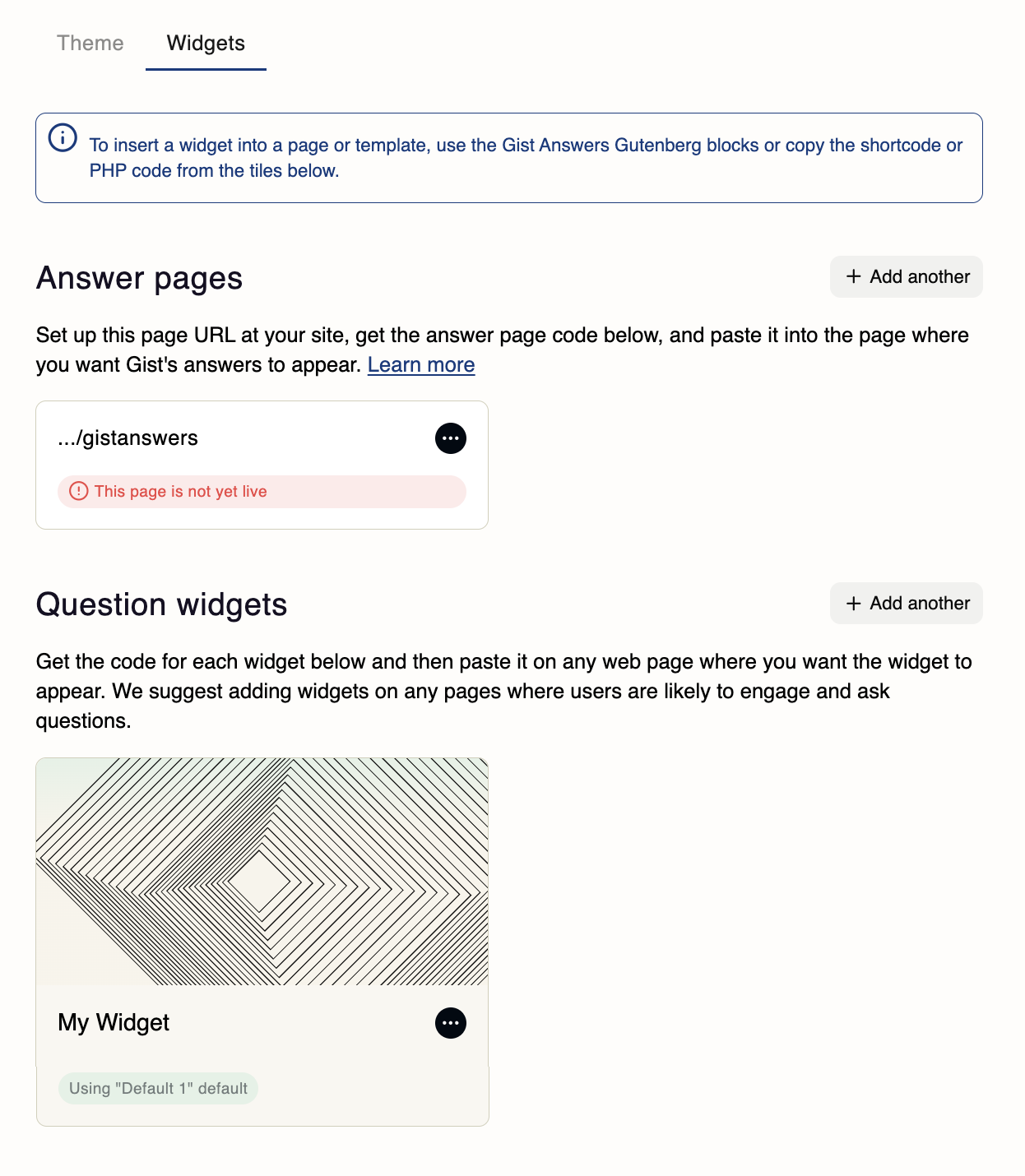
Afterwards the Widgets tab (via View widgets on the dashboard, or Gist Answers → Widgets) lists your question widgets and answer pages. A widget’s ellipsis (⋯) menu offers:
- Edit: rename the widget, choose its Answer page, preview its states, and adjust Custom colors and fonts. Depending on the layout you can also adjust scrolling and pinning offsets, the number of suggested-question rows, and more. Click Publish Changes to apply.
- Copy shortcode and Get PHP code: the exact snippets for the shortcode and PHP placement methods.
- Add another creates more widgets.
Account default settings
Accounts with several websites can share settings between widgets through account-level defaults. When a widget uses Use account default settings, any change to that default is pushed to every widget in the account that uses it, across websites.
- To apply a different default to a widget, pick it from the Use account default settings dropdown.
- To change the default itself, click Modify these default settings; the edit propagates to every widget that shares it.
- To give a widget settings of its own, uncheck Use account default settings and click Edit settings for just this widget.
Widgets you create or change in Gist can take a few minutes to become available in WordPress. If a new widget is missing from a block’s Select a widget list, wait and reload the editor.
Widget placement
Choose one method for each placement. All four render the same widget.
| Method | Widgets | Best for |
|---|---|---|
| Block | Question and Answer | Pages and posts edited in the block editor. The recommended method. |
| Shortcode | Question and Answer | The classic editor, page builders, and any field that accepts shortcodes. |
| Sidebar widget | Question only | Widget areas (sidebars, footers) managed under Appearance → Widgets. |
| PHP function | Question and Answer | Theme templates and custom integrations, such as a question bar in the header. |
For click-by-click instructions, see Step 5 of the setup guide.
Blocks
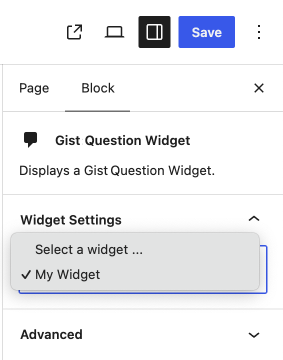
The plugin registers two blocks in a Gist Answers block category. Insert one by typing /gist in the editor or from the Block Inserter, then choose the widget under Widget Settings → Select a widget in the block sidebar.
| Block | Block name | Notes |
|---|---|---|
| Gist Question Widget | gist-answers/question | Lists the question widgets available to the current site. A widget must be selected. |
| Gist Answer Widget | gist-answers/answer | Lists the answer widgets, plus Auto-detect (recommended), which renders whichever answer widget is assigned to the page the block is on. |
Both blocks store a widgetId attribute, show a placeholder preview in the editor, and do not support editing as HTML.
Shortcode
The plugin provides one shortcode, [gist_. Copy shortcode on the Widgets tab gives you the exact shortcode for a widget.
[gist_answers_render_widget type="question" id="search-widget-xxxxxxxx-xxxx-xxxx-xxxx-xxxxxxxxxxxx"]

[gist_answers_render_widget type="answer" id="chat-widget-xxxxxxxx-xxxx-xxxx-xxxx-xxxxxxxxxxxx"]

[gist_answers_render_widget type="answer" target="answers"]| Attribute | Required | Value |
|---|---|---|
type | Yes | question (aliases search, questions) or answer (aliases chat, answers). |
id | Question: yes Answer: no | The Gist widget ID. For an answer widget, if no valid ID is given the plugin uses the answer widget assigned to the answer page: the page path in target, or otherwise the current page’s slug. |
target | No | Answer widgets only. The path of the answer page whose widget should be rendered, such as answers or help/answers. Ignored for question widgets. |
Sidebar widget
Under Appearance → Widgets the plugin adds a Gist Question Widget for classic widget areas. Add it to a sidebar or footer area and choose the widget from its Widget dropdown. In block-based widget areas it appears as a Legacy Widget. Answer widgets are not offered as sidebar widgets; use a block, shortcode or PHP on the answer page instead.
PHP function
Theme templates and custom code can call gist_. Get PHP code on the Widgets tab gives you the exact call for a widget. Guard the call with function_ so the template still works if the plugin is deactivated.
<?php
if ( function_exists( 'gist_answers_render_widget' ) ) {
	gist_answers_render_widget(
		array(
			'type' => 'question',
			'id'   => 'search-widget-xxxxxxxx-xxxx-xxxx-xxxx-xxxxxxxxxxxx',
		)
	);
}
?>
To capture the markup instead of printing it, pass 'echo' => false:
$widget_html = gist_answers_render_widget(
	array(
		'type' => 'answer',
		'target' => 'answers',
		'echo' => false,
	)
);| Argument | Type | Value |
|---|---|---|
type | string | 'question' or 'answer' (the same aliases as the shortcode). |
id | string | The Gist widget ID. Required for question widgets; optional for answer widgets, which fall back to the page’s assigned widget. |
target | string | Answer widgets only: the answer page path. Defaults to the current page’s slug. |
echo | bool | true (default) prints the widget; false returns the HTML as a string. |
Widgets rendered only from templates are not part of any post’s content, so they cannot be detected as answer pages. See Answer pages.
How widgets render
- When a page containing a widget is rendered, the plugin requests the widget’s code (a script to load in the page head and the widget markup) from the Gist Answers API. A successful response is cached for five minutes; a failed lookup is cached for one minute so an outage does not slow every page view.
- The script is enqueued and the markup printed where the widget was placed. From then on the widget communicates with Gist Answers directly from the visitor’s browser.
- Front-end API requests time out after 2 seconds (3 seconds in the admin). Developers can change this with the
gist_filter. On WordPress VIP, front-end requests go throughanswers_ api_ timeout vip_, which backs off automatically after repeated failures.safe_ wp_ remote_ request() - If a widget cannot be rendered (an unknown type, an ID that does not belong to this site, or no answer widget assigned to the page), the plugin outputs nothing visible and logs a browser-console error beginning
Gist Answers: No widget HTML is available, which names the type, ID and page slug it tried. If an answer widget’s ID does not match the page it is on, the plugin renders the page’s assigned widget instead and logs a console warning. - The rendered markup can be altered with the
gist_andanswers_ render_ widget gist_filters. See the filters reference.answers_ widget_ html
Answer pages
An answer page is the WordPress page a question widget sends visitors to. It contains an answer widget, and its URL is set in Gist as the widget’s Answer page (URL for answers to appear). It is an ordinary WordPress page: the answer widget is one block (or shortcode) in its content, so you can add your own content above, beside or below the widget, such as an introduction, related links, editorial modules or advertising, and style it with your theme like any other page. During widget setup you choose how the page is created:
- Create an answer page for me (recommended). The plugin creates a published WordPress page at the URL you chose, with the title and slug taken from the last part of the path and a Gist Answer Widget block as its content. The parent of the path must already exist, and if a page already exists at that URL the plugin leaves it unchanged and reports that it exists. You can edit the page afterwards.
- I’ll create the answer page myself. Create the page at that URL and add the answer widget with a block, the shortcode, or PHP.
Detection
Whenever a published page or post is saved, the plugin checks its content for answer widgets added as a block, as a shortcode, or as pasted Gist widget HTML. If Gist Answers does not already associate that page with an answer widget, the plugin sends its permalink so Gist can. Existing content is detected the next time it is updated. Two placements are not detected: answer-widget blocks nested inside other blocks (Group, Columns and similar), and widgets rendered only from PHP templates. The post types and statuses checked, and the number of posts processed per run, can be changed with the gist_, gist_ and gist_ filters.
Changes requested from Gist
The embedded widget-management screens can ask the plugin to create or update an answer page, for example when you change a widget’s answer page URL. Every such request is checked against the current embed session and the user’s capability to manage that site, must keep the same domain, and will not overwrite an existing page.
Changing an answer page URL
Open Gist Answers → Widgets, find the page under Answer pages, choose Edit from its ellipsis menu, update URL for answers to appear and click Publish Changes. Then make sure each question widget that should send visitors there has that URL selected as its Answer page, confirm the WordPress page exists at the new URL, and test the question-to-answer journey.
Multisite
Gist Answers is network-activated on WordPress Multisite (its scope in the VIP manifest is network). The key points:
- One API key for the network. The key is stored as a network-wide option and can be entered or replaced only by a network administrator (
manage_). Site administrators who need a key changed are told to contact the network administrator.network_ options - One Gist website per site. Each site keeps its own association with a website in your Gist account, its own widgets and answer pages, and its own ingestion status and scheduled events. A site administrator can activate their own site; the Network Hub lets network administrators activate any site.
- Activate production first. The first site activated anywhere in the network must be a live site. Later sites can be production sites or test sites linked to a production site. See Activating websites.
- Where things live. The Network Hub in Network Admin lists and controls all sites; the Manage and Reports screens open from each site’s own Gist Answers menu.
- Deactivation and cleanup affect every site. Network Deactivate clears the scheduled ingestion events on every site, and the developer Danger zone tools act on all sites in the network.
On WordPress VIP, adding Gist Answers from the Integrations Center activates it for every site on the chosen environment.
Developer reference
Everything in this section is optional. The plugin works without any custom code.
Filters
| Filter | Purpose and default |
|---|---|
| Content ingestion | |
gist_ | Post types to ingest. Default array( 'post' ). |
gist_ | Eligible post statuses. Default array( 'publish' ). |
gist_ | A tax_ array content must match. Default array() (all terms). |
gist_ | Per-post eligibility: ( bool $should, int $post_id, WP_Post $post ). Default true. |
gist_ | Posts sent per run, clamped to 1–100. Default 10. |
gist_ | Seconds to wait before sending a change, clamped to 1–300. Default 5. |
| Answer page detection | |
gist_ | Post types scanned for answer widgets. Default array( 'page', 'post' ). |
gist_ | Statuses scanned. Default array( 'publish' ). |
gist_ | Flagged posts processed per run, clamped to 1–100. Default 10. |
| Widget rendering | |
gist_ | The arguments array passed to gist_ (and used by the shortcode and blocks), before it is sanitized. Return a modified array to change the type, ID, target or echo behavior. |
gist_ | The widget HTML about to be output: ( string $html, array $original_args ). Return an empty string to suppress the widget. |
| Other | |
gist_ | Sites per page in the Network Hub, up to 100. Default 20. |
gist_ | Timeout in seconds for Gist API requests: ( int $seconds, bool $is_front_end ). Default 2 on the front end, 3 elsewhere. |
gist_ | The message about to be written to the PHP error log by the plugin’s logging function. |
Actions
| Action | When it fires |
|---|---|
gist_gist_gist_ | On plugin activation, deactivation and uninstall. |
gist_ | After an API key entered in the dashboard has been validated and stored. |
gist_ | When the stored key is rejected by Gist Answers. Receives 'single' or 'network'. |
gist_ | When a post is queued: ( int $post_id, WP_Post $post ). |
gist_ | After a post’s permalink has been sent to Gist Answers: ( int $post_id, $response ). |
gist_ | When an answer widget is detected in saved content: ( int $post_id ). |
gist_, gist_, gist_, gist_, gist_, gist_, and one action per other API endpoint | After each call to the corresponding Gist Answers API endpoint, with the request object; gist_ reports the number of calls made in a request. Useful for logging and diagnostics. |
Constants and functions
| Name | Purpose |
|---|---|
GIST_ | Supplies the API key as a PHP constant (or as an environment variable of the same name). See API key sources. |
VIP_ | Defined by WordPress VIP, not by you. See WordPress VIP runtime config. |
GIST_ | Set to true to show the Developer menu. See Developer menu. |
GIST_ | The installed plugin version (read-only). |
DISABLE_ | Not a plugin constant, but it matters: with WP-Cron disabled, queued content is sent only during admin activity. |
gist_answers_render_widget( array $args ) | Renders a widget from PHP. See PHP function. |
gist_answers_error_log( string $message ) | Writes to the PHP error log through the gist_ filter, adding a backtrace when that developer option is on. |
Other identifiers you may meet while debugging: the REST namespace gist-answers/v1 used by the plugin’s own admin screens (not a public API), the WP-Cron hook gist_, options and transients prefixed gist_, and the post meta keys gist_, gist_ and gist_.
Data and external services
Gist Answers depends on Gist, a third-party service operated by ProRata.ai, and cannot work without it. The connection is made only once an API key is configured. Gist’s terms of service and privacy policy are available at gist.ai.
Requests from the WordPress server
Requests go to the Gist Answers API at https://cms.gist.ai/api/cms/v1, authenticated with the installation’s API key and identified by the site’s home URL (sent in an X-CMS-Origin header). The plugin sends:
- When the key is checked: a request that confirms the key is valid.
- When a site is activated: the site’s name, its tagline (or its name, if it has none), its domain and home URL, a Gist Answers category, a placeholder location, and the URL of its WordPress REST API posts endpoint.
- When eligible content is published or updated: the permalinks of that content, so Gist Answers can ingest it.
- When an answer page is detected that Gist Answers does not yet associate with an answer widget: its permalink.
- When ingestion is paused or resumed: the request to stop or start the crawl.
- When the plugin’s admin screens load: requests for your account’s websites (to match them to this site), their sites, widgets, ingestion status and messages, the list of Gist Answers categories, and a short-lived ticket for each embedded Gist page.
- When a page containing a widget is rendered: a request for the widget’s code, cached for five minutes.
No post content, comments or user data are sent from the WordPress server. Gist Answers reads published content through the site’s public REST API. The API key is never shown in the admin interface and is redacted from the plugin’s log output.
Content loaded from Gist Answers
- The plugin’s Manage and Reports screens embed pages from
https://cms.gist.ai/pages(website settings, widgets, questions, answers and reports). - Pages that contain a widget load the widget’s script and markup, as supplied by the Gist Answers API, in visitors’ browsers. Those widgets then communicate with Gist Answers directly; questions visitors type are sent to Gist Answers, not to your WordPress server.
Data stored in WordPress
The plugin stores the encrypted API key (when entered in the dashboard), the site’s Gist publisher association and cached site status, developer-tool settings, cached widget code (transients), and per-post ingestion and answer-page records (post meta). Nothing is stored about visitors.
Updating, deactivating and uninstalling
Updating
- Standard WordPress: upload the new ZIP from Plugins → Add Plugin → Upload Plugin and choose Replace current with uploaded, or replace the
gist-answersfolder inwp-content/plugins/. - VIP Integrations Center: VIP supplies updates; nothing to deploy.
- VIP manual install: replace the folder in your
wpcomviprepository and merge.
Settings, the API key and site associations are kept across updates. If the admin screens still look like the old version after an update, your browser has cached the plugin’s assets: do a hard refresh (Shift+Command+R on a Mac, Ctrl+Shift+R on Windows).
Deactivating
- Single site: go to Plugins and click Deactivate under Gist Answers.
- Multisite: go to My Sites → Network Admin → Plugins and click Network Deactivate under Gist Answers.
- VIP, added from the Integrations Center: in the VIP Dashboard open your application, select Integrations, choose the environment, open the ellipsis (⋯) menu next to Configure for Gist Answers, select Remove Integration and confirm with Remove. On a multisite network this removes it from every site on that environment.
- VIP, activated in code: Network Deactivate is not shown. Remove the
wpcom_vip_load_plugin( 'gist-answers' );line fromclient-mu-plugins/plugin-loader.phpand deploy the change.

Deactivating clears the plugin’s scheduled sending events on every site, and widgets stop rendering: blocks output nothing, and shortcodes appear as plain text until the plugin is reactivated or they are removed. The API key, site associations and other settings are kept, so reactivating restores the connection. The website stays in your Gist Answers account; if you want its crawl stopped, pause ingestion from the dashboard before deactivating.
Uninstalling
Deleting the plugin from the Plugins screen removes its files, its scheduled events and its per-post ingestion records. The encrypted API key and the other gist_ options are left in place so that reinstalling reconnects without re-entering the key. To remove them as well, enable the developer menu first and use the Danger zone options (Delete the API token from the database and Delete all Gist Answers database options), optionally trashing the pages and sidebar widgets that contain Gist widgets, before deleting the plugin. To remove the website from your Gist Answers account, contact support@gist.ai.
FAQ
Does Gist Answers replace the Gist console?
No. The plugin connects WordPress with the Gist console and API. Reporting, website configuration, widget management, the Sandbox, suggested questions and other Gist features are managed in the Gist console and shown inside WordPress by the plugin.
Where do I find my API key?
In the onboarding email from answers@gist.ai, which also contains the Set password button for your console account. Check your Junk or Spam folder. If you cannot find it, contact your Gist onboarding contact. On WordPress VIP with the Integrations Center, the key is entered in the VIP Dashboard rather than in WordPress.
Can I use several widgets on one site?
Yes. The plugin lists every widget available to the site’s Gist website, and you choose which one each block, shortcode, sidebar widget or PHP call renders. Creating separate widgets for navigation pages and for articles is recommended.
Why doesn’t a widget I just created appear in WordPress?
There can be a short delay before newly created or updated widgets become available in WordPress. Allow a few minutes, then reload the relevant screen.
How do I see how many questions visitors have asked?
Open Gist Answers → Reports → Answers in WordPress. Content Usage shows which of your content is being used in answers, and Revenue shows revenue reporting. On Multisite, open these from the site’s own admin menu.
Can ingestion be limited to certain categories, tags or post types?
Yes, with the filters described under Customizing what is ingested. By default only published posts are kept in sync; pages and custom post types need a filter.
Does the plugin detect answer pages automatically?
Yes, for answer widgets placed with the block, the shortcode or pasted Gist widget HTML in published pages and posts, when the page is saved. Blocks nested inside other blocks and widgets rendered only from PHP templates are not detected. See Answer pages.
What happens to my data if I deactivate or delete the plugin?
Deactivating keeps everything and stops widgets rendering (shortcodes show as plain text while the plugin is inactive). Deleting removes the plugin files and its per-post records but keeps the encrypted key and settings unless you clear them with the developer Danger zone first. Content already ingested stays in your Gist Answers account until you ask support to remove the website. See Updating, deactivating and uninstalling.
Changelog
| Version | Changes |
|---|---|
| 1.0.14 | Add instructions URL, fix handling of multiple feeds per publisher, fix publishing scheduled posts, fix other issues. |
Versioning follows semantic versioning. This release requires no migration.
Support
Email support@gist.ai or your Gist onboarding contact. Include the affected website or page URL, what you were doing, and the status or error you see. For setup problems, the Troubleshooting section of the setup guide covers the most common cases.